PullG

Your BLDC motion platform, simplified.

4 Actuators // 100Hz // CAN Bus // Zero Sensors
Sensorless homing — no limit switches needed SimHub integration — UDP at 100Hz Web dashboard — control from any device Setup wizard — racing in minutes Safe shutdown — platform lowers gently
GO!

Feel Every Apex

PullG ODrive Controller

Sensorless homing. Real-time CAN bus. Web dashboard. Your BLDC motion platform, simplified.

4 Actuators // 100Hz // CAN Bus // Zero Sensors // SimHub Ready
Get Access Learn More
Available Now New: Seatbelt Tensioners

See It In Action

A purpose-built web interface for monitoring and controlling your motion platform.

5 Laps at Bathurst

Full walkthrough of the rig, the ODrive/BLDC motor concept, and 5 laps of Mount Panorama showing the platform in action.

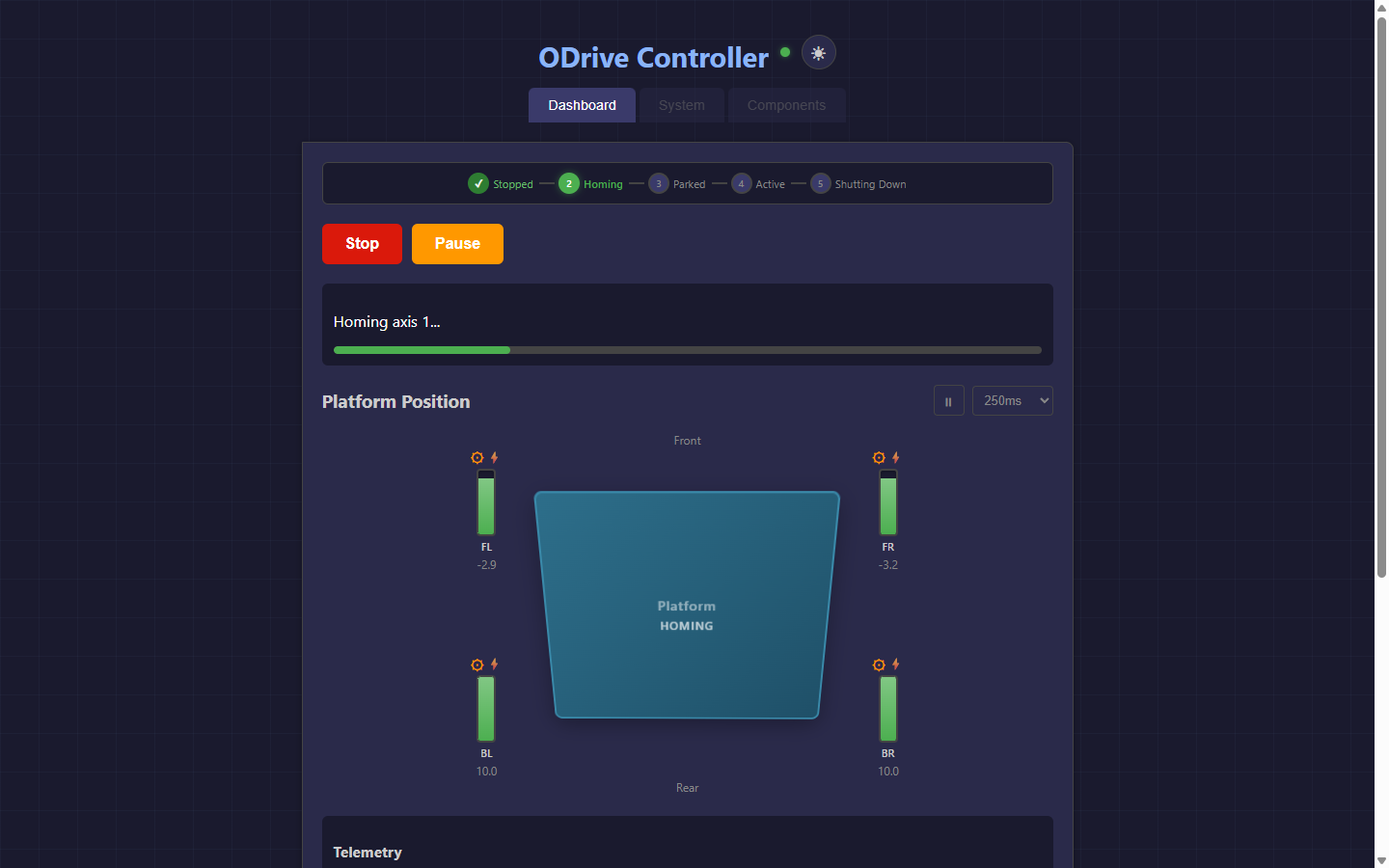
Dashboard during homing sequence

Live Dashboard — Homing Sequence

Real-time actuator positions, motor status indicators, and lifecycle stepper showing the sensorless homing process in action.

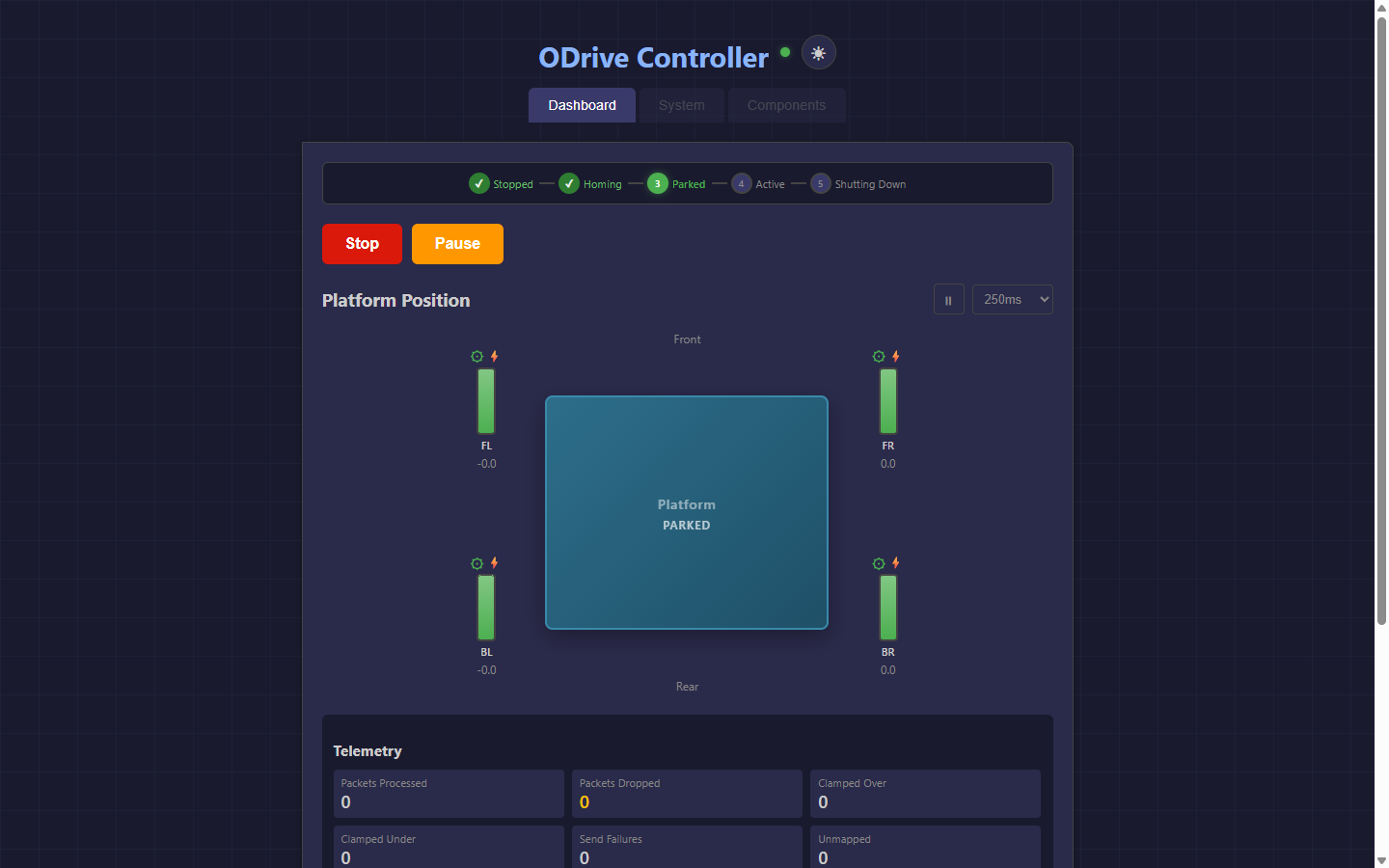
Dashboard in parked state

Parked & Ready

Platform homed and waiting for SimHub. All four actuators at home position with live telemetry.

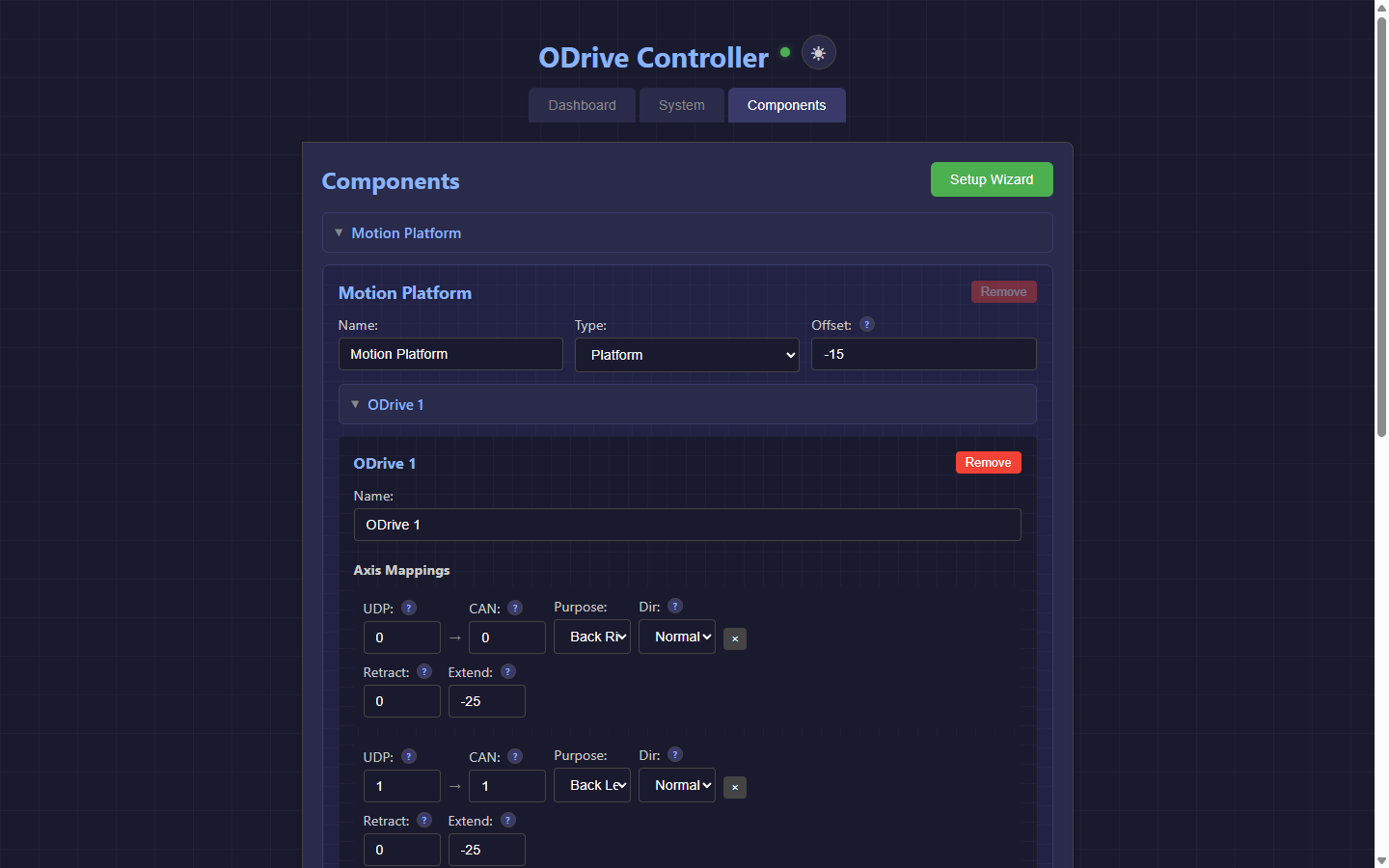
Component configuration

Component Configuration

Hierarchical config: components contain ODrives, each with per-axis direction, limits, and purpose mapping.

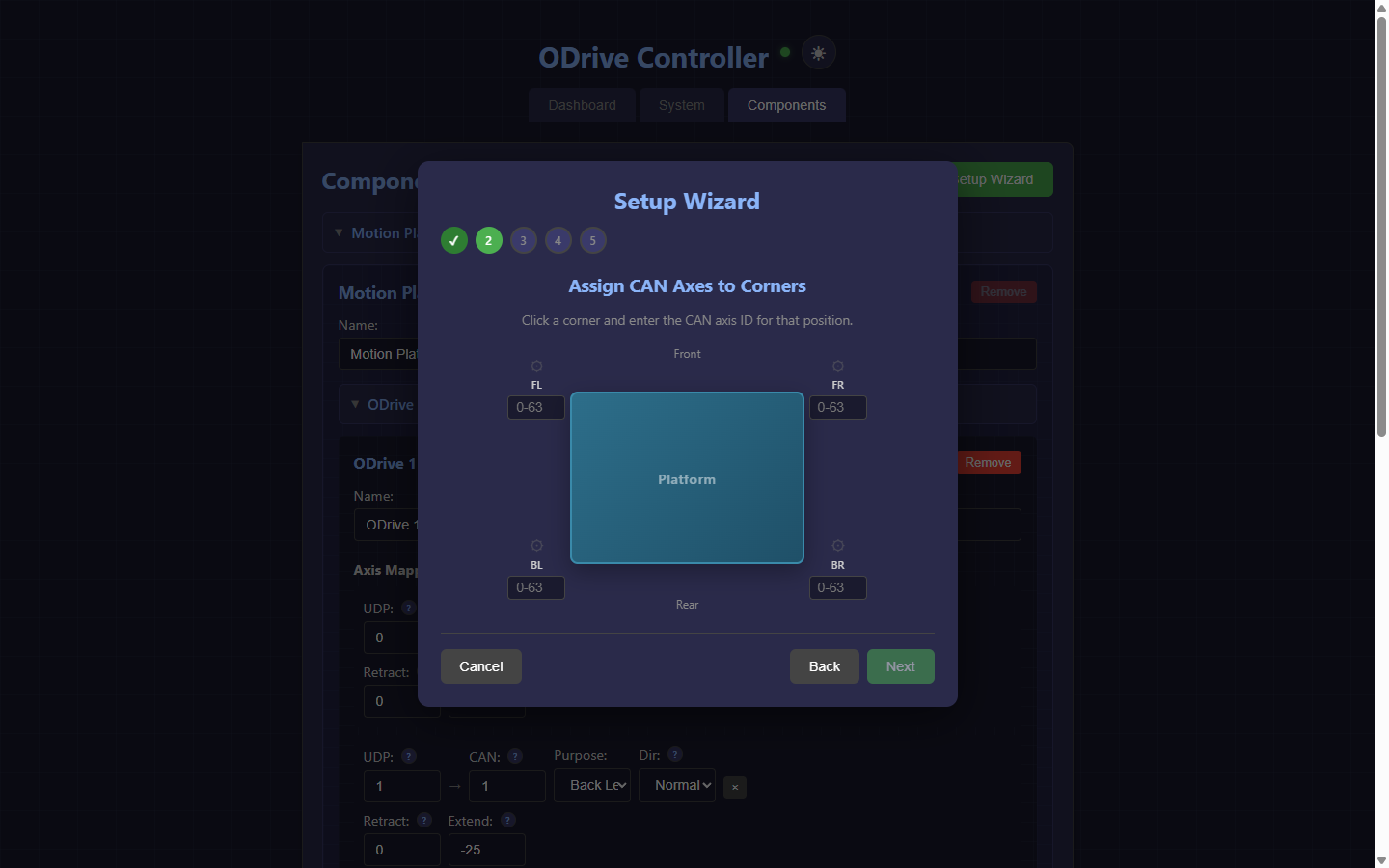
Setup wizard axis assignment

Setup Wizard

Visual axis assignment — click platform corners to assign CAN axes. Includes direction testing with safe jog commands.

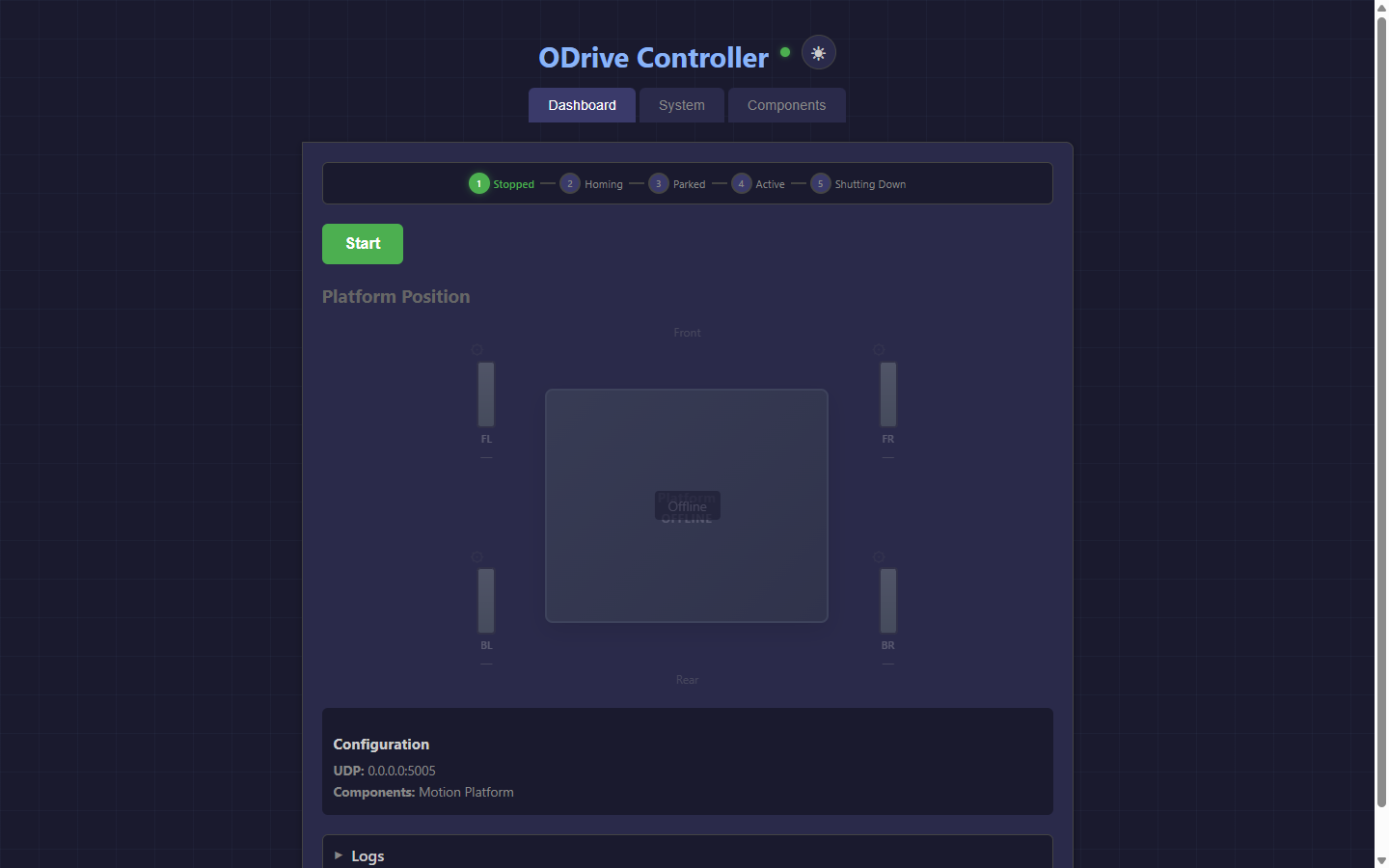
Dashboard idle state

Idle State

Clean overview when the system is stopped. Connection status, config summary, and collapsible log viewer.

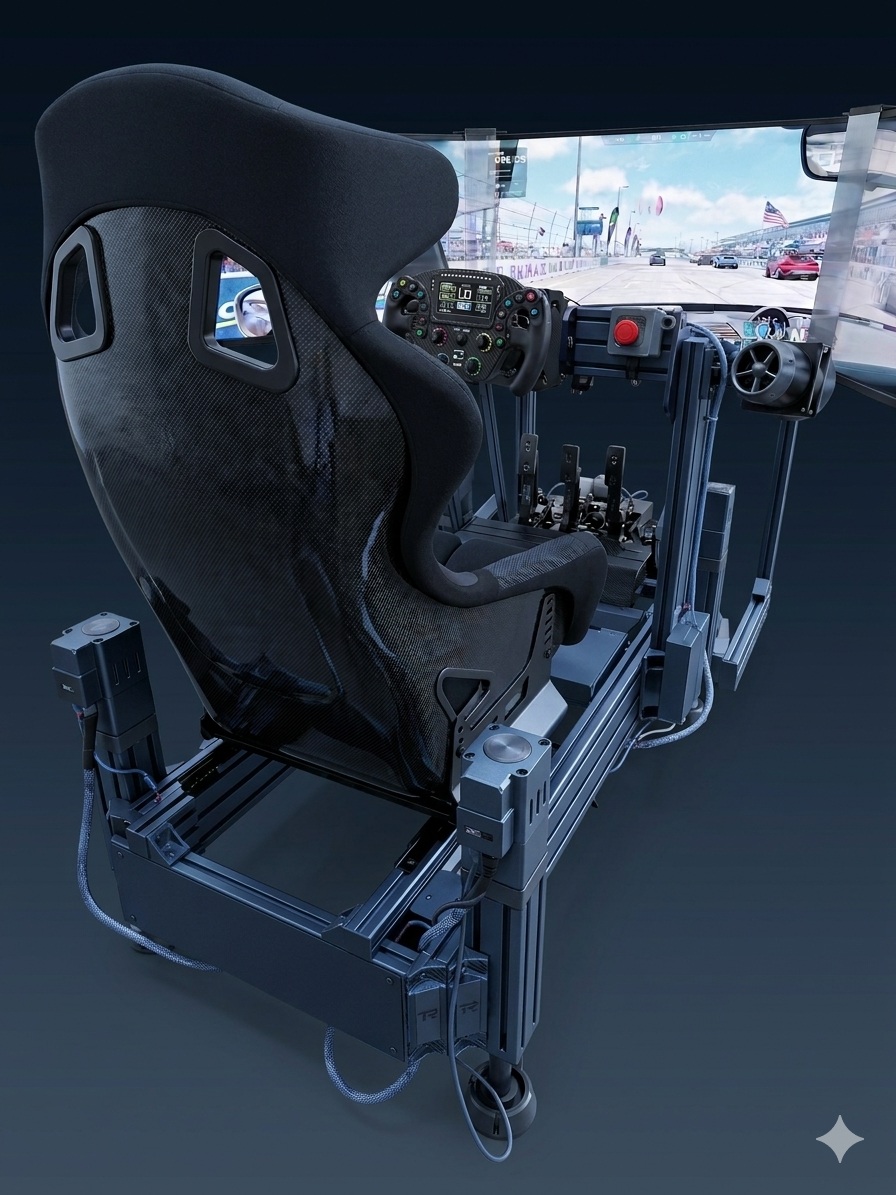
Example BLDC motion rig

Why I Built This

I love tinkering, and the idea of using off-the-shelf hobbyist BLDC motors for a motion simulator was too good to pass up. I picked up some second-hand motors and ODrives from a like-minded sim racer, and got to work figuring out how to make it all talk to SimHub.

What I quickly found was a gap — there was nothing like the polished controller software that exists for servo and AC systems. No homing, no web interface, no plug-and-play setup. Just raw CAN commands and a lot of trial and error.

So I built it. What started as a weekend project has turned into something I want to share with the community. If you're running ODrives on a motion rig and wish the software side was easier — this is for you.

How It Works

PullG sits between SimHub and your ODrive controllers.

Game Telemetry

Your sim game (iRacing, ACC, etc.) sends telemetry data to SimHub.

SimHub Motion

SimHub converts telemetry into actuator positions via UDP.

PullG Controller

Translates UDP to CAN bus. Manages homing, limits, safety.

ODrive + Motors

BLDC motors move your platform in real-time.

Requirements

The Stack, Explained

Why this combination of hardware and protocols — and what the tradeoffs are.

Why BLDC Motors?

Cheap, powerful, and widely available second-hand. High torque density, no brushes means low maintenance. Tradeoff: need a controller and tuning — not plug-and-play like servo or AC systems.

Why ODrive?

ODrive was originally open-source, which spawned a healthy ecosystem of compatible clones — many cheaply available on AliExpress and from hobbyist suppliers. If you're budget-building, there's real value there. If you're in a position to support the ODrive team with an official unit, it's worth considering — they built the ecosystem everyone's building on.

Either way, clone quality varies, so check the compatibility guide before you buy — some handle high currents cleanly, others introduce noise that causes problems at the worst moments. Firmware v0.5.6 is the sweet spot — stable CAN Simple support, well-understood behaviour, and what most clones ship with or can be flashed to.

Why CAN Bus?

One cable daisy-chained across all axes — versus 4+ USB cables to a hub. Differential signalling makes it electrically robust and immune to motor noise and EMI. Deterministic timing means no USB packet jitter at 100Hz. Tradeoff: needs a USB-CAN adapter (cheap, ~$15–30 AUD) and basic wiring know-how.

Why Sensorless Homing?

No microswitches to mount, wire, or replace. No false triggers from vibration. Tradeoff: slightly less precise than hard limit switches, but more than adequate for a motion platform.

Standing on the Shoulders of Giants

The sim racing motion community has done incredible work over the years — projects like SFX-100 and others pioneered the approach of using ballscrew linear actuators with aluminium extrusion bodies, and that collective knowledge informs a lot of what's out there today. A second generation of designs, including the Lebois SRT80 and others, iterated on that foundation — refining the approach and moving to 8080 extrusion as a proven, cost-effective platform.

Our own actuator design sits in that generational tradition and evolution. But here's the thing — the actuator design is only one piece of the puzzle... This is what sets PullG apart.

PullG is a software interface layer/controller for your ODrive, not a prescription for a specific actuator. The actuator choice is yours — if you can fit Brushless DC motors to it and use an ODrive, then PullG can be there to help you drive it. It's perfect for the DIY builder. We may release our own actuator plans if there's enough interest from the community, so jump on Discord if that's something you'd like to see.

Hardware Compatibility

Tested with official and third-party ODrive-compatible controllers.

✓ Supported

Official ODrive v3.6

Fully tested and recommended. Dual-axis, reliable at high currents.

✓ Supported

ODrive Clones (most)

Most ODrive-compatible boards work well with CAN Simple protocol.

✓ Recommended Clone

Sequre DESC V4.2 (56V)

Single-axis unit. Good alternative to official ODrive if going the clone route.

⚠ Known Issues

Sequre ODESC 3.6

Hardware limitation — noise feedback at high currents causes encoder errors. Not recommended.

Starting Grid

Ten features lined up and ready to race. Pole position goes to the ones that matter most.

P1

Sensorless Homing

Two-pass hard stop detection — no limit switches needed

P2

SimHub Integration

UDP position data with auto startup/shutdown handling

P3

Safe Shutdown

Sensorless landing — platform lowers gently on power-off

P4

Web Dashboard

Live telemetry, 3D platform tilt, control from any browser

P5

Setup Wizard

Visual axis assignment with safe jog testing

P6

CAN Bus Control

250kbps CAN Simple — 4 axes at 100Hz+ real-time

P7

Multi-Platform

Raspberry Pi, Linux, or Windows — headless auto-start

P8

Dark & Light Themes

Workshop dark mode with blueprint grid aesthetic

P9

Mobile Responsive

Monitor your platform from any device, any screen size

P10

Docker Deploy

One container to install, update, and run — zero hassle

Technical Specs

Built for the ODrive ecosystem with proven hardware.

Motor Controller
ODrive v3.6 / v0.5.6 firmware
Communication
CAN Simple @ 250kbps
CAN Adapter
CANable-MKS (gs_usb)
Host
Raspberry Pi, Linux, or Windows
Actuators
Linear leadscrew, 4 corners
Encoders
8192 CPR incremental
Trajectory Mode
Trapezoidal (110 rev/s, 95 rev/s²)
SimHub Protocol
UDP position packets @ 100Hz

Get Access

Full software access on both plans. Choose flexibility or lifetime value.

Requires a SimHub Motion Addon license (sold separately by SimHub).

Grid
$5 AUD / month
  • Full software access — all features unlocked
  • 2, 3, and 4-actuator platform support
  • Seatbelt tensioner support
  • Web dashboard with real-time telemetry
  • Setup wizard with visual axis assignment
  • Access to updates
  • Monthly license key
  • Cancel anytime — no lock-in
Subscribe Monthly

Common Questions

Answers to the things people usually ask first.

Do I need programming knowledge to use PullG?

No. The setup wizard and web dashboard handle everything. If you can flash firmware and connect a CAN adapter, you're good.

Will this work with my existing ODrive setup?

If you're on firmware v0.5.6 with CAN Simple enabled, yes. PullG doesn't replace your ODrive configuration — it talks to it.

What games are supported?

Any game SimHub supports — iRacing, ACC, Assetto Corsa, rFactor 2, Dirt Rally, F1, and many more. PullG receives SimHub's motion output, so game support equals SimHub's game support.

Can I use fewer than 4 actuators?

Yes — 2 and 3 actuator platforms are supported.

Does this work on Windows or only Linux/Pi?

All three — Raspberry Pi, Linux PC, or Windows. Docker makes deployment consistent across all of them.

What happens if my PC crashes mid-session?

This is one of the reasons running PullG on a Raspberry Pi is recommended — it operates independently from your sim PC, so a game crash or PC freeze doesn't take the motion platform with it. PullG detects the lost connection and lowers the platform gently.

If you run PullG directly on your sim PC, you lose that independence — typically the ODrive will freeze in place when the PC goes down, which is safe but not graceful. The Pi setup is cheap, headless, and purpose-built for exactly this kind of always-on role.

Why not just use a commercial motion solution?

Cost and flexibility. Commercial or complete systems are polished but expensive. This stack lets you source motors and hardware second-hand and tune everything yourself. PullG is the software layer that makes it as approachable as those systems.

What's a CANable and where do I get one?

A USB-to-CAN adapter — the hardware bridge between your host machine and the ODrive controllers. The MKS CANable (or similar gs_usb compatible device) costs around $15–30 AUD on AliExpress. Search "CANable MKS" or "gs_usb CAN adapter".